Could it be that it needs a data cable to upload instead of a recular USB?
I had that problem using VESCtool.
Sketch uses 4724 bytes (15%) of program storage space. Maximum is 30720 bytes.
Global variables use 735 bytes (35%) of dynamic memory, leaving 1313 bytes for local variables. Maximum is 2048 bytes.
Error: cannot set com-state for \.\COM5
Error: unable to open port COM5 for programmer arduino
Failed uploading: uploading error: exit status 1
For those following along with the development here, I’m excited to announce that a massive upgrade is almost ready: BREmote v2.5.0-Evo (Beta).
Building on the incredible foundation from LudwigBre and Janrusher, v2.5.0-Evo is a huge leap forward. Here is a quick teaser of what is included:
Fully Working TX/RX GPS: Real-time speed directly on the handheld remote.
GPS Anti-Spoofing & Safety Gates: Rigorous coordinate cross-checking between the remote and the board.
Flash Data Logging: Onboard logging of VESC telemetry, GPS, and voltage, downloadable over WiFi.
V3 Config Studio: A brand-new offline HTML config tool.
Return-to-Me (RTM) & Follow-Me (FM): The compass and GPS logic for autonomous tracking are fully operational!
🛠️ Beta Testers Needed: My dual-motor buggy is waiting on a new VESC, so I need a few people with working setups to help test the hardware in the wild. If you're interested, please sign up via this Google Form.
⚠️ Please Note: Because v2.5-Evo introduces so many new features and architectural changes, follow updates and discussion here.👉 (https://foil.zone/t/bremote-future-development-topic/20820/267)
Please head over to the new thread to read the full release details, grab the source code, and leave any questions, thoughts, or feature requests. Let's keep all v2.5-Evo discussion over there so it's easy to track!
P.S.: I also have to biuld my Nano kit. so that will be next. but the v2.5-Evo already supports M10 GPS chip (in addition to the BN220). So RX will use the BN880 with compass, and the Nano could fit a micro HGLRC M100 (M10 Chip) GPS.
Super excited! Thanks for pushing this
Will look into it for sure, may I ask though to rethink the name? V3 in my mind will be the next hardware revision, so maybe we can call it V2.3 or V2-evo or something?
BREmote Nano + display errors after firmware update — need help
Hi all,
I’m having trouble getting my BREmote Nano and its display working properly. Here’s the timeline of what happened:
Initially, the display was not working at all (no output).
I flashed the display with the latest firmware, and it started working — but it showed an error code “ESV” (wrong config with the firmware)
I then tried flashing the latest firmware again on the display, and also flashed the Tx (Nano) with the latest firmware.
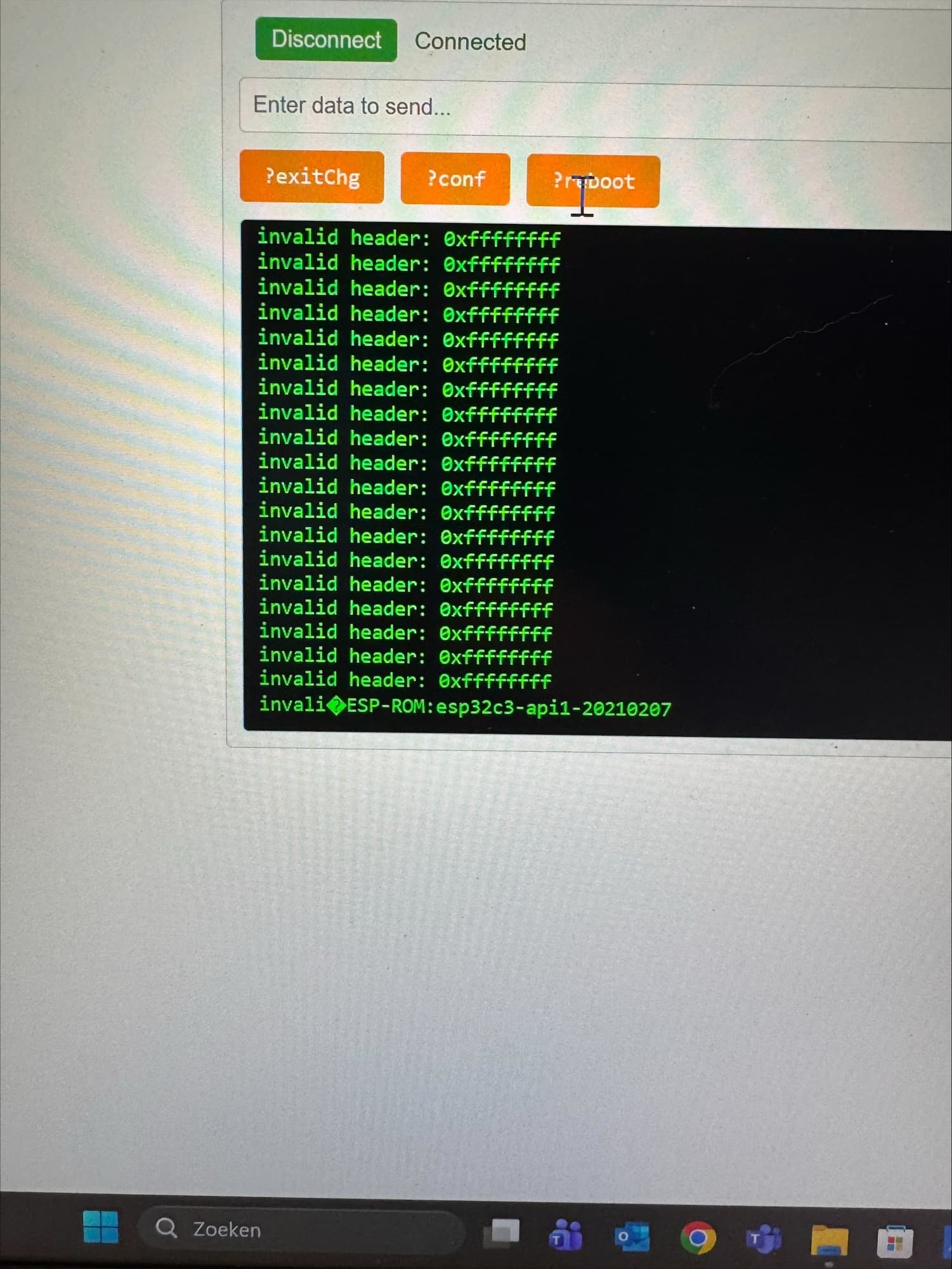
After that, the display stopped working again. Now on the Nano side I’m getting a stream of “invalid header: 0xffffffff” errors in the serial monitor, followed by an ESP-ROM boot message (esp32c3-api1-20210207) when it resets.
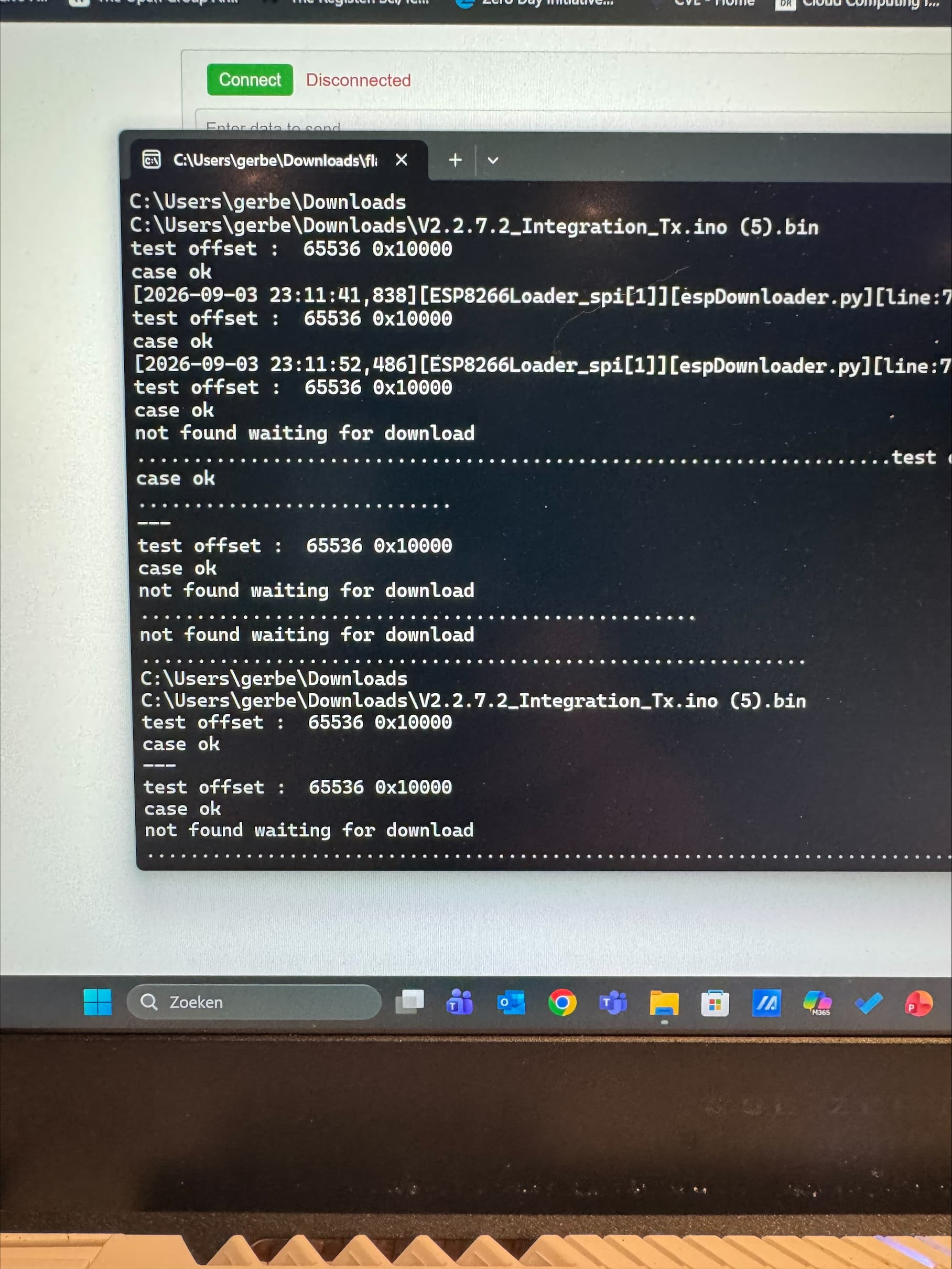
On the flashing tool side, I also see “not found waiting for download” and “case ok” / “test offset: 65536 0x10000” messages when trying to flash, and it doesn’t seem to complete the download properly.
At this point neither the display nor the Nano seems to be working correctly. Could someone help me understand:
What’s causing the repeated “invalid header: 0xffffffff” errors on the Nano, is this a corrupted flash, wrong firmware offset, or a hardware/connection issue?
Why does the flasher report “not found waiting for download”, does the ESP32C3 need to be put into bootloader/download mode manually (e.g. holding a boot button) before flashing?
What’s the correct step-by-step procedure to fully re-flash both the Tx (Nano) and display firmware from a clean state to get everything working again?
Any help getting both back to a working state would be much appreciated. Thanks in advance!
That just means you have newer firmware than config on the remote - you need to update config.
There is a video for this here: LINK
In your case a ?clearSPIFFS and ?reboot would solve this
That means the firmware you uploaded is somehow broken, likely corruption during downloading
Go to the BREmote GitHub, to releases, download the latest Tx.merged
Upload the .merged to address 0x0
After flashing turn off and on again, wait for the reformatting, done
Probably means you did not tick the small checkbox next to where the path for the firmware is selected
Also, please note this is the old thread for the BREmote V1, please alsk V2 questions in the V2 thread in the future.