I wasn’t sure if I should set “enable slow abs current limit” to true with the warning that popped up. If I keep getting spikes, I’m guessing I want to know about them? Once I have the settings dialed so that spikes aren’t happening, I suspect I will enable it then.
Here’s what I tuned for tomorrow’s test:
Reduced KI to 20 (from 31)
increased VESC ramp time to 0.6S (from 0.4)
deadband down to 10% (from 15%)
voltage filter constant down to 25 (from 45)
current filter constant 0.2 (from 0.1)
observer gain scaling start 70% (from 90%)
I’m guessing the KI being too high was the main culprit for the spikes. Full disclaimer - I worked through this problem with chat gpt, so if you see any counterproductive settings, please let me know. If you think uploading screenshots of all my settings is better info, I can do that
I would not change the filter constants! This will influence more parts in the system… If you want less current sensitivity enable the slow abs maximum
Also the observer gain start change does not make much sense to me
Maybe next time let AI also explain or critically ask why those changes are necessary and what implications they have
That way it will stop hallucinating/lying if it is not sure
I fed this back into AI (mentioning I was going to copy your inductance) just to see the reasoning… here it is if you’re curious…
FIRST: You should NOT copy his KI or inductance value
Here’s why:
1. KI = 33 on his system does NOT mean KI = 33 is correct for yours
Even small differences cause big changes:
different prop load
different shaft length
different cable length
different motor stator batch
different motor calibration
different ESC cooling
different voltage sag under load
One person’s KI = 33 can be perfectly stable
while another person’s KI = 30 causes current overshoot.
You already proved your KI was too high:
You logged a 220.5A ABS_OVER_CURRENT fault. And it happened right at the point torque demanded a rising current ramp. That means the current controller overshot.
That is the textbook symptom of too much KI on a large motor.
KI = 31.06 → overshoot spike to 220A
This is not hypothetical — it already happened.
Your system told you the truth.
2. You should absolutely NOT change inductance manually
Inductance is measured by the VESC using its calibration routine.
His inductance of 6.69 mH does not mean yours is wrong.
Even two motors from the same brand often differ by:
10–20% inductance
10–15% resistance
5–15% flux linkage
Your 8.26 mH is entirely plausible.
If you force the wrong inductance:
you break the observer model torque becomes unstable you increase the chance of desync at higher duty you risk even more current spikes
Rule: If the motor detection succeeds, you do NOT hand-edit inductance unless you have an LCR meter.
Maybe ask why you should “copy” the values the AI proposed then.
As the AI has no motor, those values can also only come from another user and the same “reasoning” not to use those values, should apply to the values AI itself made you put in.
Take prop off motor. Run medium calibration wizard and get your inductance and resistance setting etc.
Max erpm because it doesnt matter.
Motor current 160a
Battery current 100a
Abs max current 250a
Set voltages correctly for 12s
Temps should be good as standard
Save config
Set remote to forward only no braking
Calibrate remote.
Save config
I have only ever needed that and have run well over 20 setups without blowing vesc.
Then put prop back on and test in water.
Check solder joint as a loose or bad one can cause havoc with current spikes.
I am wondering if the ERPM should be adjusted to avoid over speed when the prop is not in water.
I got also a flipsky 6385, with a flipsky foldable prop, so a 12s could reach about 7000rpm when fully charged (140kv *50v)
If i assume that under load my motor wont reach more than 5000 rpm (50v * 100kv) should I choose a max ERPM of 35000? (5000rpm * 7 poles)
Only thing missing in your list is to check that phase filters are off for the flipsky models that don’t have them but enabled in software by default
However OP came back from the water with problems of overcurrent cutoff. So in that case redoing or changing the motor calibration is an additional step needed.
I ran the motor setup again (wasn’t sure I had the prop attached or not) and got a few different numbers. I kept everything else the same and ditched the AI changes. Still getting cutout of power at 90% throttle on H level. I think this might be my connection of my triplex motor cable to my vesc. I’m going to order some quality bullet connectors and see if that fixes the issue. I was able to foil today on M setting (mostly on my knees because I’m so used to holding a kite bar or a wing boom, and it’s a new sensation of instability without). I also had a touch and go mast (2 feet) which made it difficult to raise up and not cavitate right away. But I’ll get there. I’ll check back in once I try the new connectors. Here’s my new settings…
Yep, the numbers and the way the vesc measures are not perfectly accurate. That’s also why changing one of those values will not completely break everything
Anyways, the fact that you elongated your motor wires is an important information for this topic. Which wire crosssection and which length did you add? this may well be the problem and prevent you from driving those high currents at all.
Maybe you can share an image that shows the location and arrangement of all components
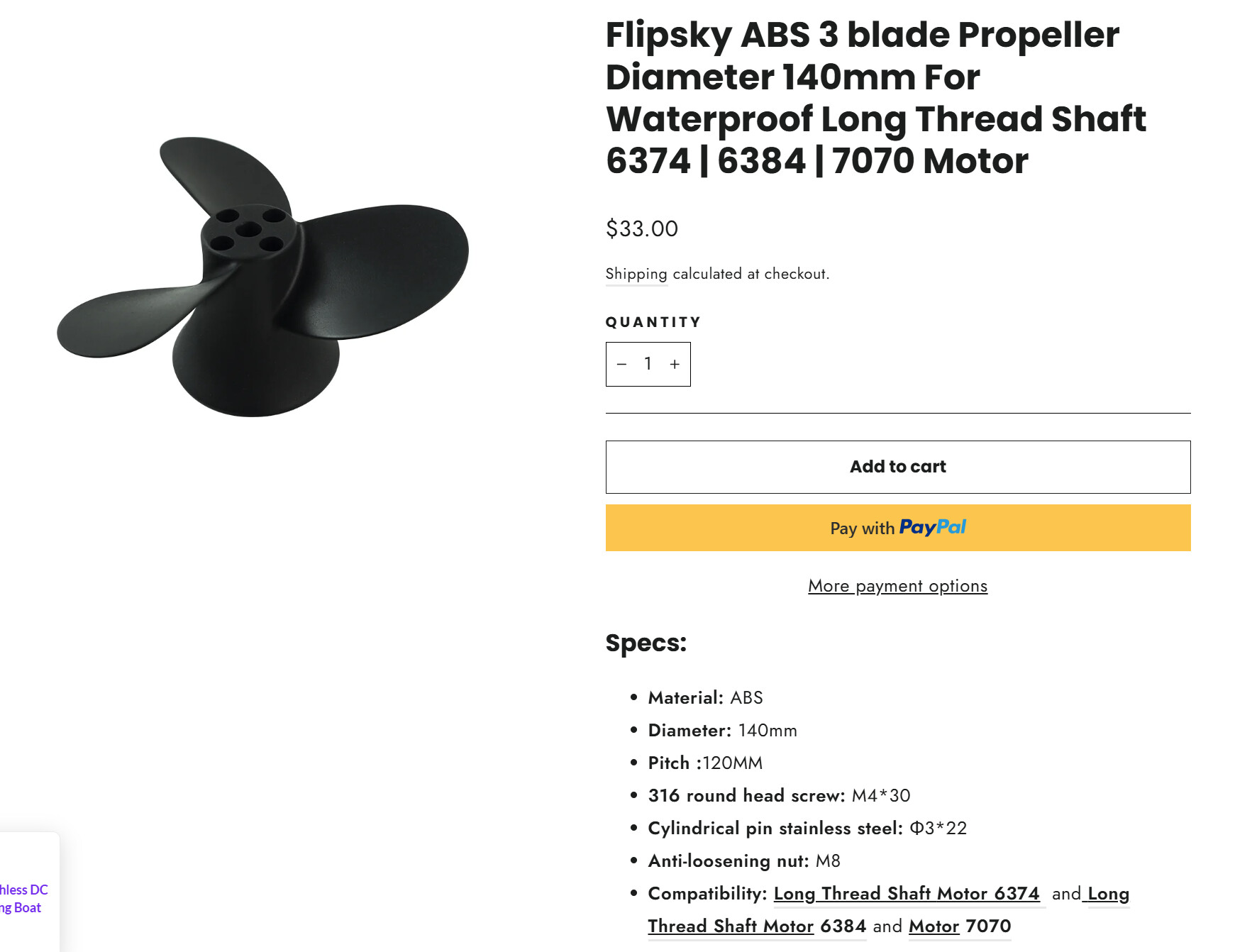
Which Prop are you using? if your pitch is too high you might reach the over-current protection while your motor is still not producing much thrust.
have you thought about logging your data and posting to vetr? i believe the 75200 pro has built in Bluetooth, so you only need the vesc app. That might be the easiest way to diagnose…
I switched my 12AWG for a waterproof round cable that is 10AWG so it would seal on a cable gland going into the box. I think the connection I have may be introducing resistance. It’s a brass tube connector with set screws. I’m guessing bullet plugs rated to 150A, crimping, or soldering would be a better connection.

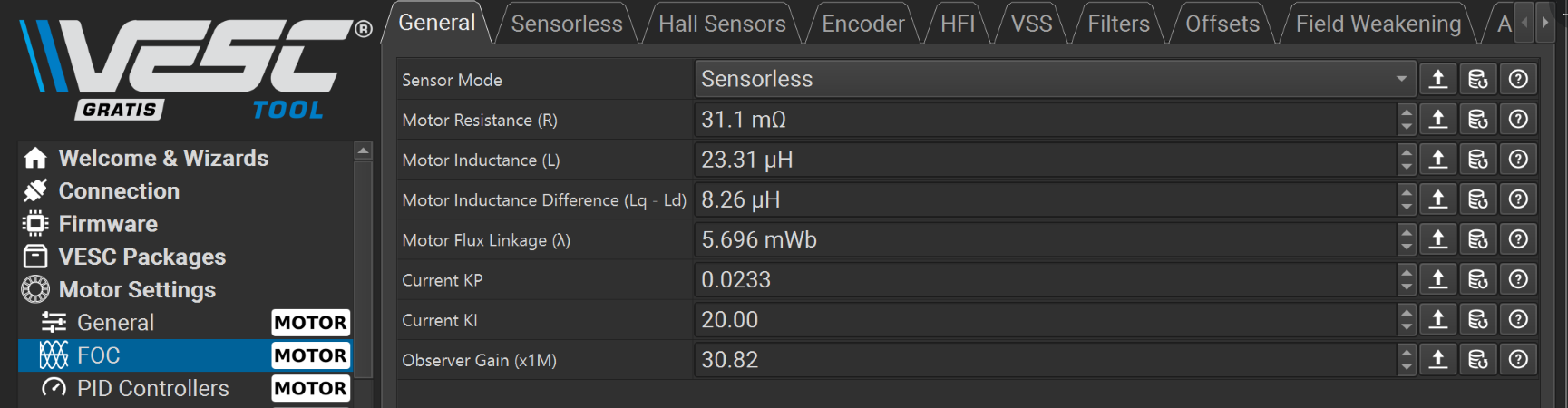

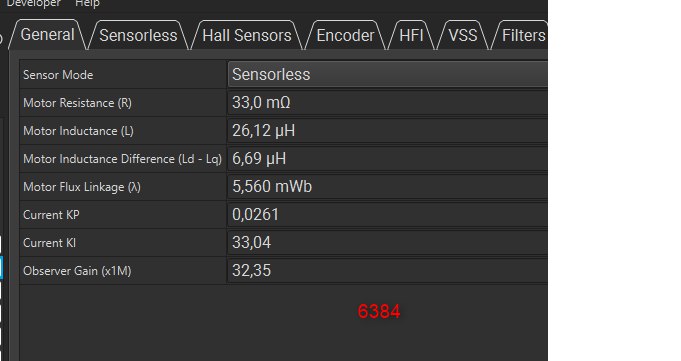

 FIRST: You should NOT copy his KI or inductance value
 1. KI = 33 on his system does NOT mean KI = 33 is correct for yours
 You logged a 220.5A ABS_OVER_CURRENT fault.
 you break the observer model