Yes
PWM0 for ESC0 (marked E0 on the Rx)
PWM1 for ESC1 (marked E1 on the Rx)
holy crap its alive. Soooo stoked thanks Ludwig this is awesome.
1 Like
So, what is a good solution for the water ingress detection?
I used those PCB type electrodes, but getting 95% false positives, to the point where at the one time I really had water inside, I did not even go ashore to check.
They corrode like crazy even in salty air I guess and also pick up condensation.
I was thinking about two solid copper wires inside a 3D printed case or something like that?
1 Like
tbh I did not do much work on testing and refining this function for V2.
I have noticed the sensitivity be a bit high and trigger with electromagnetic interference, need to check how to solve this in hard- or software…
The corrosion is weird though, they are driven in a way that should prevent this from happening… I will look into that
In my own efoils I usually use 2 parallel aluminum tape strips as electrodes
I don’t think they corrode during use, but just by being in a high humidity salty environment.
Understood, maybe aluminum is the better choice then
Or gold coated PCBs…
I have added a potential fix, reduced sensitivity and less frequent polling for less corrosion through voltage
1 Like
Have the same issue with the wet detection PCB we got with the V1 bremote.
Maybe 2 nickel strips may be a good alternative to aluminum, they should also be rather corrosion resistant… or stainless steel
2 Likes
Sounds good.
I’ll try two pieces of scrap aluminium! 
Does anyone have a picture of the screen layout and what each item represents? What line is signal strength versus controller voltage. What are you able to see when the VESC is hooked up properly?
Thanks
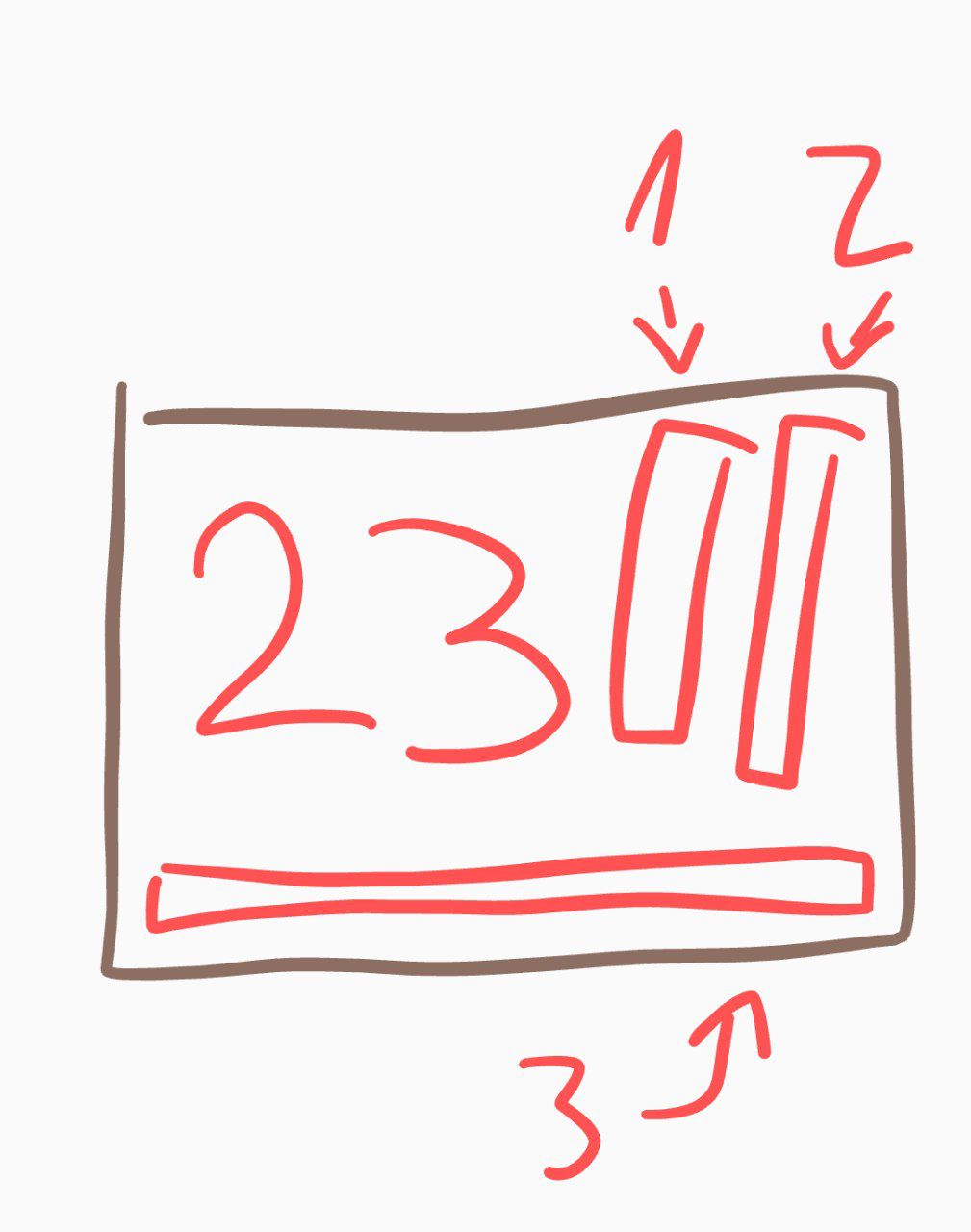
23: Speed in kmh
- Bargraph Temperature VESC
- Bargraph Connection strength
- Bargraph Battery Charge of Foil
The battery and temperature lines will only appear if VESC is connected properly. If the connection fails after the remote is turned on they will start blinking showing the last value
2 Likes
@ludwig_bre I always thought that signal was on bottom and battery on the right side? (2 and 3 reversed from your graph)
In software V2.1.x that was the case
In V2.2.x I changed it to have more resolution on the battery graph
is there currently any use for the vibration motor ?
No, the current software does not actuate the motor at all
Hi Ludwig
I have an issue when I went to test boogie I have left my Bremote on and battery died I have since charged it but now when I plug in power Rx is flashing one second intermittently and tx comes up with EP when I go through pairing sequence it doesn’t pair it just goes back to EP and Rx goes back to one second intermittent flash.
What else could I have done wrong?
Please send me config of RX and Tx.
Also, which value is shown when you turn on the remote after Boot?
Config hasn’t been changed from original configuration and it was working fine. Pwm low 1000 and high set to 1900 on both the only thing changed was before test I accidentally left remote on which drained battery and when I recharged and tested tx went through reboot and calibration but and ERror in pairing kept popping up. When I try and pair it won’t. Do I need to reconnect to computer again and check frequencies
Please send me the config string of Rx and Tx
Also which number is shown on the display after the boot has finished?
After boot up is VI 4.1 on tx