BREmote V2 - Open Source Remote

Update on my gps issues, gps module would revert to old settings after some time for some reaseon. After a loads of mostly hopeless AI troubleshooting (chatgpt) Google gemini delivered a working solution. No sure why, seems like the same code in general, but will change baud rate (confirmed with oscilloscope) reliably. Hope this helps somebody .

void configureGPS() {
  // UBX-CFG-PRT packet for 115200 baud (UART1, 8N1, UBX+NMEA)
  // Checksum is pre-calculated here for reliability
  byte setBaud[] = {
    0xB5, 0x62, 0x06, 0x00, 0x14, 0x00, 0x01, 0x00, 0x00, 0x00, 
    0xD0, 0x08, 0x00, 0x00, 0x00, 0xC2, 0x01, 0x00, 0x07, 0x00, 
    0x03, 0x00, 0x00, 0x00, 0x00, 0x00, 0xC0, 0x7E
  };

  // UBX-CFG-RATE for 5Hz (200ms)
  byte setRate[] = {
    0xB5, 0x62, 0x06, 0x08, 0x06, 0x00, 0xC8, 0x00, 0x01, 0x00, 
    0x01, 0x00, 0xDE, 0x6A
  };
  setUartMux(1);
  // 1. Initial connection at default GPS speed
  Serial.println("GPS: Connecting at 9600...");
  Serial1.begin(9600, SERIAL_8N1, P_U1_RX, P_U1_TX);
  delay(200);

  // 2. Send Baud Change Command
  Serial1.write(setBaud, sizeof(setBaud));
  
  // CRITICAL: flush() only clears the buffer, hardware needs time to send
  Serial1.flush(); 
  delay(50); // Give the UART hardware ~50ms to finish sending the packet
  
  // 3. Switch ESP32 to the new speed
  Serial1.end();
  delay(100);
  Serial1.begin(115200, SERIAL_8N1, P_U1_RX, P_U1_TX);
  Serial.println("GPS: Baud switched to 115200");

  // 4. Send Rate Command at the new speed
  delay(100);
  Serial1.write(setRate, sizeof(setRate));
  Serial1.flush();
  Serial.println("GPS: Config Complete (115200 baud, 5Hz)");
}
3 Likes

Thanks! Seems like a timing issue
Will test this on my side and include the improved code into the repo

Thanks again for the code!
Some other people had the same issue that was solved by this change
Here is the temporary .bin file to upload to 0x10000
Will update Github soon, currently also working on logging and integrating the new BN220 GPS

Edit: Now on GitHub, latest release: Release V2.2.4 · Luddi96/BREmote-V2 · GitHub

3 Likes

Thank you @robke and @ludwig_bre this file solved my GPS issues.

One question - sometimes when I turn on my remote it displays “99” even though the RX+GPS are stationary. Does the “99” mean it is trying to get a connection?

After a few restarts of the TX or letting the RX sit powered on for a few minutes…it eventually displays “00” and seems to function as intended.

99 = GPS module ok, but no satellites so no speed info

1 Like

@ludwig_bre thanks so much for all your hard work and making it open source. I am going through your git hub now to gain understanding how it all pieces together in a hope of creating a wing / sup version. I would like to achieve a similar concept to duotones remote in that the main components are wrist mounted with a throttle slide mounted to the index finger to allow the hand to still grip while using the throttle with the thumb. If you have any tips or thoughts let me know!

So to upload this GPS fix.bin file, do we use the same method outlined in the Firmware Update chapter of this video? https://youtu.be/r6JIZEq3aTU?t=2385&si=pBi7CP7-1RwAoMwf

Yes, upload to 0x10000

1 Like

Hi Ludwig,
Do you think dual steering works with this dual ESC?
Flipsky FT85BD
I’ve started construction but I have a doubt; I’m waiting for your answer before continuing.

Thanks :slight_smile:

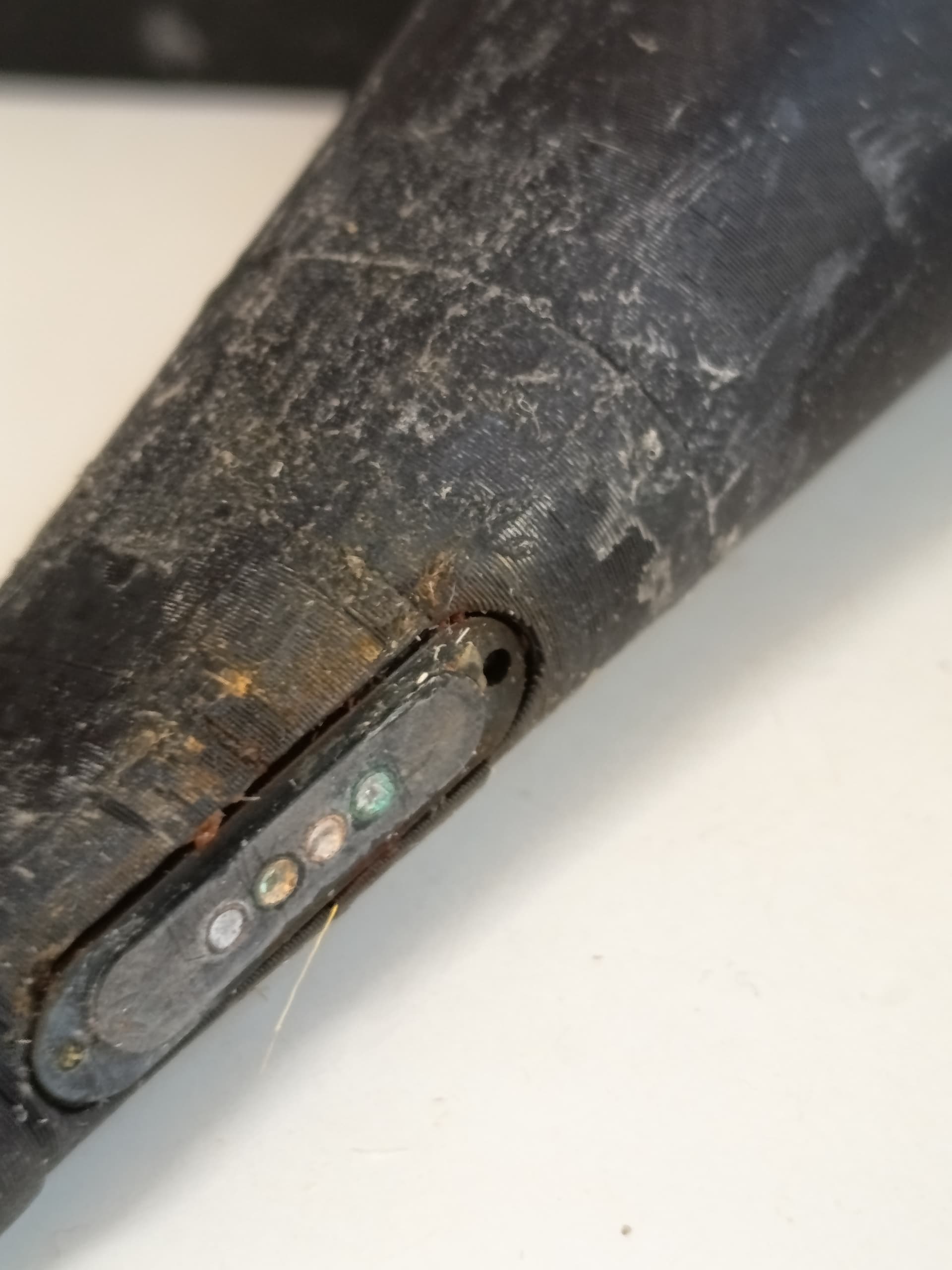
So as a follow up. This is how mine looks after two weeks of almost daily use in seawater.

No charging, no USB connection.

Cleaning with a brass brush and isopropanol easily got me to charging again.

There is also some amount of rust.
Probably from the magnets?

Not sure how to prevent this from further deteriorating. Maybe silicon grease on the area around the connector?

The corrosion can only happen when external voltage is applied to the charge port (ie charge connector is plugged in)

During that time no water must be present!

Please make sure to charge only when completely dry, if possible remove the “sleeve” over the handle so no water can get trapped inside there…

For removing the corrosion I would try a brass abrasive brush and clean with IPA afterwards

I am not sure how to solve this problem otherwise - except make the handle inner and outer part 1 singular part, so no water can get trapped in-between through capillary action
Or make a bigger cutout in the handle in this area so water can evaporate / be cleaned easier

Ludwig, no idea for FT85BD ? Thanks

It has dual PPM input, so I do not see why it should not work
However I generally don’t know about the performance of this esc especially in terms of cooling and reliability

Odd this was unused since November, did clean and charge it then and now just used it without charging until down to 3.4V.

What does “ECH” actually say in real world terms?
Once in seawater, mine does “ECH” every single start until I clean it again.

Guess that is related?

I think having the port completely in the open would be best. How it is done on the current model looks very professional, but is somewhat impractical to service.

But I don’t think it matters with the amount of runtime I get. I just take it apart every three weeks of use, clean it and charge.

ECH means that the status output of the battery charger IC put out and undefined voltage state
If possible turn on the remote and measure if you have any voltage on the charging pads of the remote

In that case it could also generally be helpful to put some thick grease on the pads to protect and just wipe it off before charging

Thanks :+1:

I will measure the next time I have ECH and take it apart.

You can measure now as well, if there is a voltage I would expect it there all the time
Measure all permutations of pad 1:4

Third pad from the bottom has 0.3V to 0.4V to all other pads, rest is close to zero.

1 Like

To protect the contacts, put a small piece of duct tape over it when you use it.

1 Like

I put silicone grease on mine. I’ve done this since it was first built and don’t have any rust build up as yet :crossed_fingers: