hi @ludwig_bre, I got a kit an without a gps, but i changed my mind and i am looking to add a bn-220 module.
I have connected the gps on the uart as described in the github for VESC and enabled the GPS on the TX and RX configuration but so far i got no speed on the TX screen.
am i missing something?
?printGPS gives me the following even though the GPS has been booted for a while:
----- GPS Satellite Status -----
Satellites in view: 0
HDOP (Horizontal Dilution of Precision): Invalid
Location validity: Invalid
Date/Time validity: Invalid
Course validity: Invalid
Chars processed: 1303082
Sentences with fix: 0
Failed checksum: 0
Thanks in advance!
EDIT: I got it working, i updated the RX firmware to the logger, i am looking forward to test the logging features
Happy you got it working
As background information, the firmware without logger is still expecting a NEO-6M GPS module, that’s why it was not working
BN-220 modules need the logger firmware
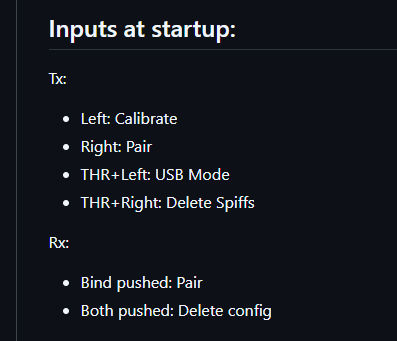
Can someone please remind me how I can recalibrate left, right and centre on the Bremote v2? I already have it calibrated but want to do it again as think it is a bit off. I’ve checked the videos but can only see reference to the first time.
Please send me the files as PM so I can check Until then, you can also open Terminal and send “?list” then pick one and send “?download <filename.log>” to get a csv representation.
EDIT: Thanks for the data. Since your VESC does not deliver any data (probably incorrect connection) and logtrc deletes every row until the first throttle is detected from VESC (to cut away idle time before entering the water) the log is reported as “empty”.
You can send ?dbit0 to enable VESC debug data and make dure the connection is working.
Alternatively use this log viewer for the GPS data only (no input filtering): LINK
You may remember the BREmote V2 Nano, that was originally designed with 10 LEDs. While that idea made the cost and complexity lower, it increased assembly difficulty and reduced readability of data.
I have changed the design of the Nano to also feature the full display like the “big” V2.
Here is the updated tutorial:
openfoil is preparing the sale of the new kit and will keep you updated separately.
Together with ludwig i was able to figure out what was going wrong here. There was no vesc data in my logfiles which resulted in the error at logtrc. Although i had my vesc connected to the bremote RX it did not get the data because i had set data_src = 2 assuming it would only effect the source of the voltage measurement. instead it completely disables the vesc data connection.
hi @ludwig_bre i have been testing the logging and it seems to work properly, i am able to connect to the rx via wifi and download the .log data.
It is definetly a nice solution since i dont have to take my phone with.
but so far i was not able to open the log files (binary?) either with the VESC Tool or the logtrc app. For some reason i am not able to open the local folder of the app an the app does not allow to choose a diferent folder…
Ordered, Thanks ! Could you please confirm the “Big” Led display is included as we can’t really tell from the pictures nor from the description…
Can’t wait
using the web works, thank you.
is there any way to review the logs offline?
and yet another question :P, on my session yesterday I got an E7 on my Tx, i assume it was a VESC to hot error, as it got to 62 deg C, is that true? or what does it mean E7, i did not found it on Github…
EDIT: i have been reviewing my logs and it seems the GPS dropped… i suppose that is E7…
You can use this tool, it runs in your browser only without any uploads. You can also download the HTML file by clicking “save as…” and run it completely without Internet
On the subject of E7. I had the same error today. I checked and couldn’t see any water, but there had been a bit of water a few hours earlier so maybe it wasn’t 100% dry. The issue I had is that E7 stops me from changing gears, so I could only get back to check if there was water at low speed (Gear 0). If you turn the Tx off/on again, it also takes a long time to enable throttle, as E7 seems to stop/delay some of the normal boot up. I would like to know if there is water, but still use the Tx as normal.


 And since they are binary an Texteditor does not work either.